Render a Screenshot
GEThttps://shot.screenshotapi.net/v3/screenshot?token=TOKEN&url=URL&[OPTIONS]
The following options for the API call are:
TOKEN: TheTOKENor your API key should be replaced by your real ScreenshotAPI API, you can find your API key after you Sign Up or Log In to the service via the Dashboard page.
Note: If for any reason you need to get a new API key, simply click "Roll API Key" in the "Settings" card on the Dashboard. This will issue you a fresh API key and revoke access from the previous key.
URL: Website URL for the site you would like to render for the screenshot. We support a wide variety of websites types, such as single page apps, very long-content, and sites that require lazy loading or delays ensuring accurate and complete screenshots of these unique sites.
OPTIONS: Options indicates the different URL parameters keys and values that can be used to render your "perfect" screenshot. All the options for screenshots will be detailed below.
Note: Default options for the screenshot will be shown in the Options table below.
Example:
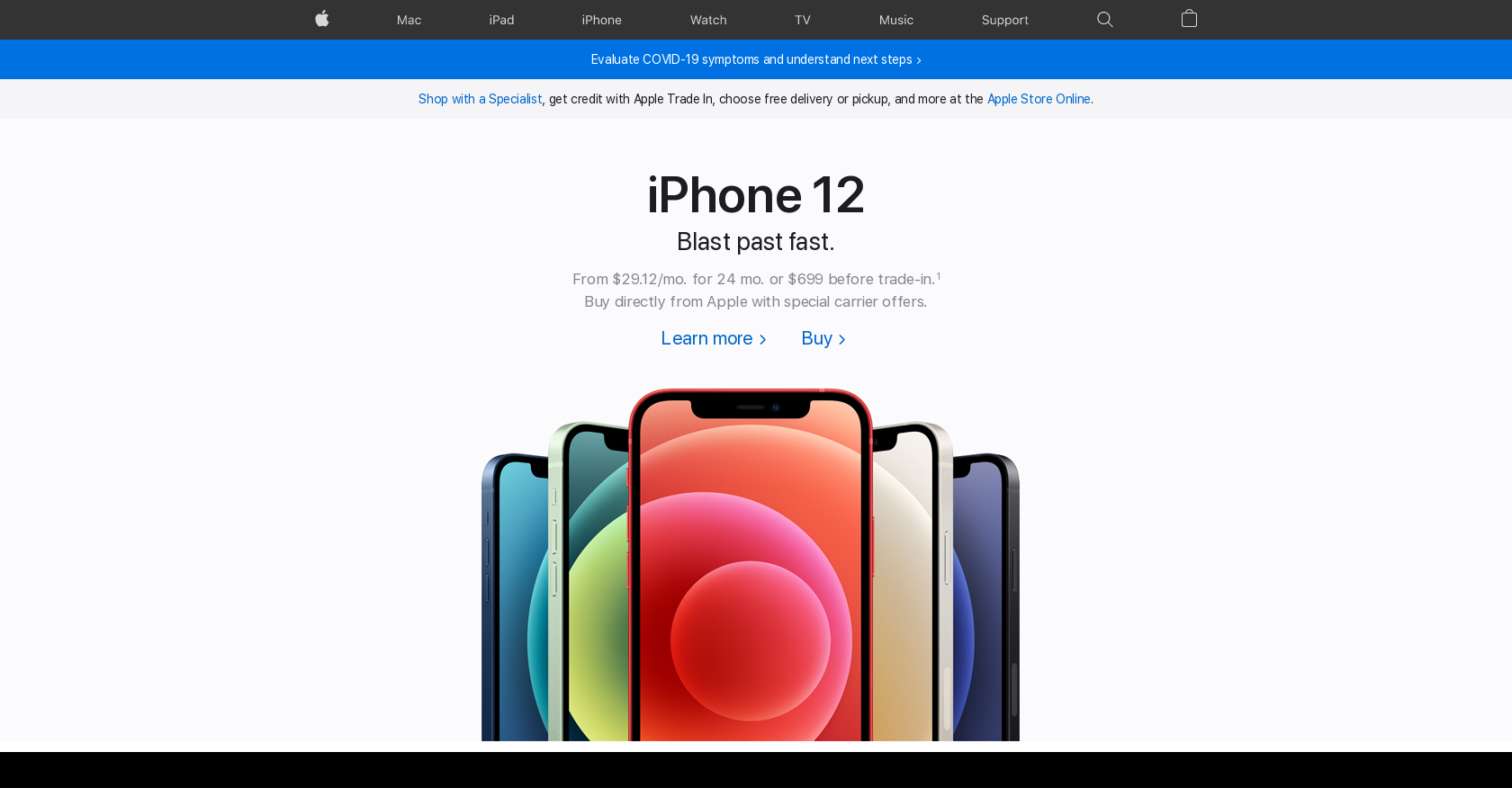
This will render the followingpngimage output when you paste in the above string into your browsers URL bar (replacing TOKEN with your API key):
 Remove elements from a page
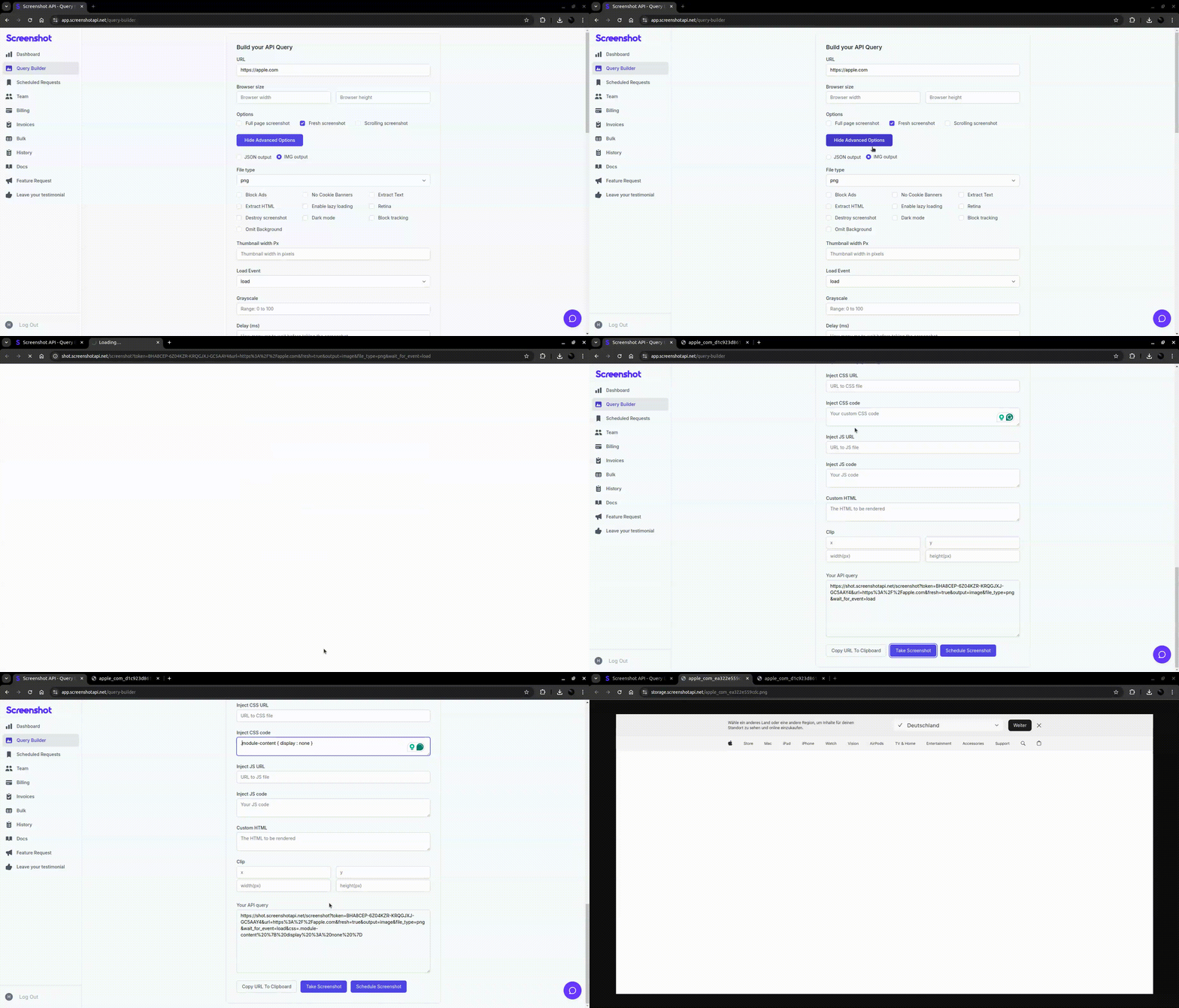
You can select elements by class name, ID, or other CSS selectors and then add thedisplay: noneattribute to hide them on the inject CSS feature.
Example:
In the following video, you'll find a more illustrative example of how to use the 'Inject CSS' functionality to remove an element from a page. In the first request, you'll see a standard screenshot to observe the page's initial state. Then, in the second request, we demonstrate how to achieve this by utilizing the 'Inject CSS' feature to remove the desired element.
Essentials
URL
Theurloption specifies the URL of the website to be rendered as a screenshot or other format.
Token
Thetokenoption is your API key for authenticating requests to the Screenshot API.
Features
Longitude
Parameter Name : longitude
Specify the longitude to be used by the browser's Geolocation API.
Provide a numeric value to define the geographical longitude for the rendering context.
Default value: null (no longitude set).
Latitude
Parameter Name : latitude
Specify the latitude to be used by the browser's Geolocation API.
Provide a numeric value to define the geographical latitude for the rendering context.
Default value: null (no latitude set).
Cookies
Parameter Name : cookies
Define cookies to be included in the request before rendering.
Supports single or multiple cookies.
Example:
cookie=value; otherCookie=otherValue;Default value:
' '(empty string).
Output
Parameter Name : output
Set the output of the results from the render. The output can be eitherJSONor the raw image captured.
If you select
JSON, the result will be returned in a structured JSON format containing metadata and other details about the render.If you select
image, the result will be the raw image file (PNG, JPG, WebP, PDF, etc.) depending on the file type specified.Default value:
JSON.
Custom HTML
Parameter Name : custom_html
Thecustom_htmloption allows you to provide custom HTML content that will be rendered instead of loading a URL. This is useful if you want to capture a screenshot of a specific HTML structure or dynamically generated content.
Set to a
stringcontaining the HTML you want to render.This will override the
URLoption, and the screenshot will be based on the provided HTML.Default value:
' '(empty string).
Result File Name
Parameter Name : result_file_name
Specify a custom name for the output file. This feature allows you to define a desired filename for the screenshot, facilitating organized storage and retrieval.
Note: If a non-unique filename is provided, it may overwrite an existing file with the same name in storage. To prevent data loss, ensure each filename is unique or avoid using this feature unless necessary.
Cookies Template
Parameter Name : template_id
Specify the unique identifier of a predefined cookie template to be used during the screenshot process. This allows you to authenticate or set specific browser state before capturing the page. Learn how to get template_id
Default value:
" "(no template id).
Note: If a validtemplate_id is provided, the system will apply the corresponding cookie data before navigation. Ensure the template exists and is correctly formatted to avoid request errors.
Bring Your Own Bucket (BYOB)
Parameter Name : byob
Allows the use of a custom storage bucket that has already been configured under the Storage Integrations tab. This enables direct saving of screenshots to your own cloud bucket instead of the default storage.
Default value:false.
Note: Make sure the storage integration is properly set up and tested before enabling this parameter.
Storage Service
Parameter Name : storage_service
Specifies which storage service to use for saving the screenshot whenbyob is enabled and multiple services are already configured. This must match the exact name of the service listed in the Storage Integrations tab (e.g., aws, wasabi, google_cloud).
Supported services:
Amazon S3 (aws) - Amazon's highly scalable and reliable cloud storage service. Industry standard for object storage with global availability.
Wasabi - Cost-effective cloud storage compatible with S3 APIs. Offers faster upload speeds and predictable pricing without egress fees.
Google Cloud - Google's robust cloud storage platform with strong integration capabilities. Provides excellent performance and seamless integration with other Google services.
Default value:' '.
Note: This parameter is required when byob is set to true. Ensure the selected service is correctly configured and tested.
Bucket Name
Parameter Name : bucket_name
Specifies the name of the storage bucket to which the screenshot will be saved when byob is enabled. This must match the exact bucket name configured under the Storage Integrations tab. Specify this if you have multiple buckets configured under the same service.
Default value:' '.
Note: This parameter is required when byob is set to true. Ensure the bucket is correctly configured and accessible.
Timezone
Parameter Name : timezone
Simulates a specific timezone in the browser during screenshot rendering.
Use IANA format (e.g., America/Tijuana, Asia/Karachi, Europe/London). See the list of supported timezones.
Default value:
' '(Server's local timezone).
Note: Useful for rendering time-sensitive content (e.g., clocks, date displays, localized versions). Make sure the target site respects client timezone.